

From Photoshop to PhotoStudio-My Lightroom Alternative Journey

Table of Contents
My Lightroom Alternative Journey
How my journey from analogue photography to digital editing, Lightroom and the search for a better workflow eventually inspired me to create my own photo editing application.
Learning the hard way: From taking photographs to editing them
When I first started my journey into digital photography, my ambition was simple: I wanted to become a professional photographer.
Coming from an analogue photography background, I was beginning to explore the possibilities of digital cameras. I had acquired a Canon EOS 10D and purchased a computer that came bundled with Adobe Photoshop and Lightroom. I was taking reasonable photographs, learning as I went, and looking for opportunities to turn my passion into a paid profession.
What I didn’t fully understand at the time was just how much digital photography had changed the expectations of clients.
I discovered this rather painfully during one of my first experiences photographing an aspiring model. She was working with a professional makeup artist, and I agreed to photograph her for free. After the shoot, I handed over the unedited JPEG files, believing I had fulfilled my part of the arrangement.
Their reaction was not what I expected. They were incredibly unhappy that I hadn’t retouched the photographs.
The criticism stung. I had approached the shoot from my analogue background, where taking the photograph was one part of the process and the darkroom was another world altogether. I had never really explored the digital equivalent of that darkroom.
It was a wake-up call. If I wanted to succeed as a professional photographer, taking a good photograph was no longer enough. I needed to understand digital retouching, colour grading and the finishing process that turned a photograph into a polished, professional image.
I knew I had a lot to learn.
Three months to get my editing together
Not long afterwards, my brother asked me to photograph his wedding. This was another unpaid job, but it was an opportunity I wasn’t going to turn down.
His future wife showed me some beautifully toned and edited photographs, and suddenly I had a deadline. In three months, I needed to learn enough about digital editing to deliver wedding photographs that I could genuinely be proud of.
I started with Photoshop.
For anyone unfamiliar with the software, Photoshop is an incredibly powerful image editor. However, editing a large collection of photographs individually is not necessarily the most efficient way to work when you have a wedding or event to process.
I spent approximately a week editing the 150 final wedding photographs.
The results were an improvement, but the amount of time involved made me think seriously about my workflow. If I wanted to photograph weddings, events and other assignments regularly, I couldn’t afford to spend a week processing every collection of images.
That was when an idea first took hold in my mind: speeding up the workflow.
It might sound obvious now, but at the time it was a significant realisation. I needed a way to achieve consistent results across a large number of photographs without repeating the same editing steps over and over again.
Discovering Photoshop Actions
I began researching Photoshop more deeply and discovered Actions.
Actions allowed me to record and repeat a sequence of editing steps, applying the same treatment to multiple photographs instead of recreating the effect manually every time.
I was particularly interested in toning. Wedding photography often benefits from a consistent mood and colour palette, and I needed a practical way to achieve that look without spending hours on each individual image.
I found a website offering Photoshop add-ons, including Actions that could be downloaded and used for free. Among the first I discovered were looks inspired by Fuji Velvia film, cross-processing, vintage photography and sepia.
These became some of my essential tools.
I could begin experimenting with different treatments, build a recognisable style and, most importantly, reduce the time spent editing every photograph from scratch.
My next opportunity was a commission to photograph rehearsals for a classical orchestra. I had developed a small collection of Actions that gave me several different looks to work with, and I could now apply those treatments much more efficiently.
Instead of spending a week editing a collection of wedding photographs, I processed the orchestra rehearsal images in approximately two days.
That was a considerable improvement.
I was beginning to understand that professional photography wasn’t just about the quality of the original image or the skill involved in retouching it. It was also about developing a repeatable process that allowed me to deliver good work within a realistic timeframe.
But I could see that there was still room for improvement.
Lightroom: The workflow I had been looking for
I realised that if I wanted to photograph events regularly, I needed to become even faster. Photoshop Actions had helped, but I was still looking for a more complete solution.
That was when I opened Lightroom, which had come bundled with my computer.
Over the following year, I gradually developed a workflow that transformed the way I processed photographs. I began creating and saving specific presets for different types of photoshoots, building a collection of looks that I could apply with a single click.
Eventually, I was able to process and deliver event photographs in three hours or less.
For me, this was a real breakthrough.
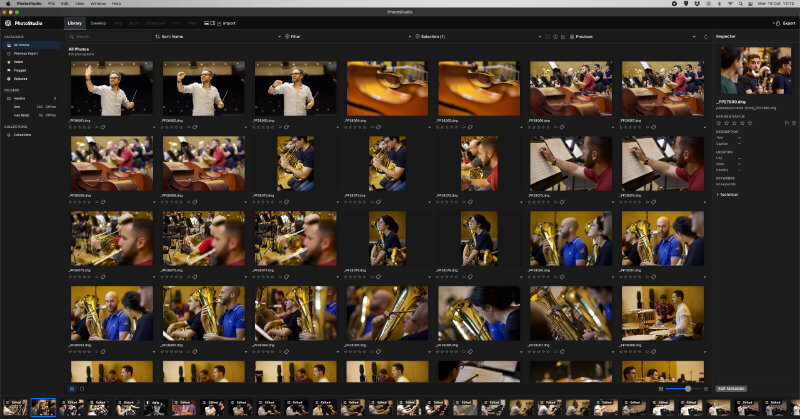
Lightroom brought together the things I had been trying to achieve separately. I could manage a large library of photographs, work through a shoot efficiently, create a consistent tone and mood using presets, and send individual photographs directly to Photoshop when more complicated retouching was required.
The workflow made sense.
Rather than treating every photograph as a separate editing project, I could work with an entire collection, establish a consistent look and concentrate my detailed editing efforts where they were actually needed.
This was exactly what I had wanted from the beginning: an application that helped me manage my photographs and process them efficiently, without sacrificing the creative decisions that made each image work.
I was happy with Lightroom as a standalone application. It had become an important part of my professional workflow, and I had invested considerable time in learning how to use it effectively.
For a long time, everything worked as I wanted it to.
Then the software landscape began to change.
The subscription model changed everything
I have always been a little old-school when it comes to software. I like to purchase an application, learn it thoroughly and keep using it for as long as it serves my needs.
The move towards subscription-based software was something I found increasingly difficult to accept.
I could see discussions from Adobe users expressing frustration about recurring costs, dependence on internet connectivity for certain account and activation functions, and updates that sometimes introduced bugs or disrupted established workflows.
Those discussions reinforced my own concerns. For a working photographer, software is not simply something to experiment with in your spare time. It is part of the process of delivering work to clients. Reliability matters, and so does knowing what your tools will cost over the long term.
I continued using my older versions of Adobe software for as long as I could. Eventually, compatibility with my version of macOS became a problem, and I had to reconsider my options.
I did think about subscribing. Lightroom had served me well, and abandoning a familiar workflow was not a decision I took lightly.
However, I began exploring alternatives.
Searching for a Lightroom alternative

My first move was to Affinity Photo. I also experimented with ON1 Photo, Capture One and Darktable.
These are all capable applications, each with its own strengths and approach to image editing. Exploring them was valuable because it exposed me to different ways of handling photographs, developing RAW files and building an editing workflow.
Yet I kept coming back to the same problem.
I missed Lightroom.
Not necessarily every individual feature, nor the idea that one application must be better than all the others. What I missed was the way the entire workflow fitted together.
I had become accustomed to managing a large catalogue, selecting photographs, applying presets, making adjustments and moving on to the next image. When more detailed work was required, I wanted the flexibility to approach it separately.
I had spent years refining that process. It was fast, familiar and suited the way I worked as a photographer.
Although I could appreciate what the alternatives offered, I found myself spending too much time trying to adapt to different workflows rather than concentrating on the photographs themselves.
I began to wonder why there wasn’t an alternative that combined the workflow I valued with a different approach to software ownership.
I had long imagined something along the lines of the alternatives that had emerged to challenge Photoshop: a serious competitor that could offer photographers another choice without requiring them to abandon the way they liked to work.
But I couldn’t find quite what I was looking for.
The idea that became PhotoStudio
At this point, I had a choice.
I could continue searching for an application that matched my needs, keep adapting my workflow to the software available, or explore whether I could build something of my own.
I wasn’t setting out to create a new industry standard or claim that I could immediately reproduce everything that established photo-editing applications had taken years to develop.
My motivation was much more personal.
I wanted an application that suited the way I processed photographs. I wanted to manage my library efficiently, work through large collections of images, apply presets, make adjustments and export finished photographs without unnecessary delays or complicated workarounds.
I wanted the workflow that had made such a difference to my photography career, combined with the features and flexibility I had come to expect from professional editing software.
And so I decided to start building PhotoStudio.
From Photoshop to PhotoStudio-My Lightroom Alternative Journey had begun as an idea born out of years of photography, retouching and workflow experimentation was about to become a much bigger undertaking than I initially imagined.
I was no longer simply looking for the right application.
I had started my own journey to create one: an application designed around my editing and processing needs, shaped by the practical realities of professional photography and informed by everything I had learned along the way.
I knew very little about just how complicated that journey would become. Managing photographs, building a catalogue, processing RAW files, interpreting presets and creating a responsive editing interface would each present their own challenges.
But the motivation was clear.
I wanted to build the photo-editing application I had been looking for.
And that was how my journey to create PhotoStudio began.
In Chapter 2, I’ll explore what happened when the idea became a real software project — from the first working builds and the challenges of creating a photo library to discovering just how much there is to consider when building a photo editor from scratch.