

Building a Photo Editing App: The First Builds and the Early Challenges
In my previous article, From Photoshop to PhotoStudio – My Lightroom Alternative Journey, I explained how years of working with Photoshop and Lightroom eventually led me to an idea: Building a Photo Editing App -why not build my own?
At the time, it seemed like a fairly straightforward ambition. I knew what I wanted from the software, I understood how I worked as a photographer, and I had a very clear idea of what I liked about Lightroom.
What I hadn’t fully appreciated was just how much work would be involved in making it happen.
Once the first builds of PhotoStudio started taking shape, the reality of software development became very apparent. Importing photographs, managing a catalogue, displaying previews, developing RAW files and interpreting Lightroom presets all presented their own challenges.
There were plenty of occasions when something that appeared to be working perfectly in one build suddenly developed a problem in the next.
This was going to be a much bigger journey than I had originally imagined.
Table of Contents
The First Big Challenge: Importing and Managing Photographs
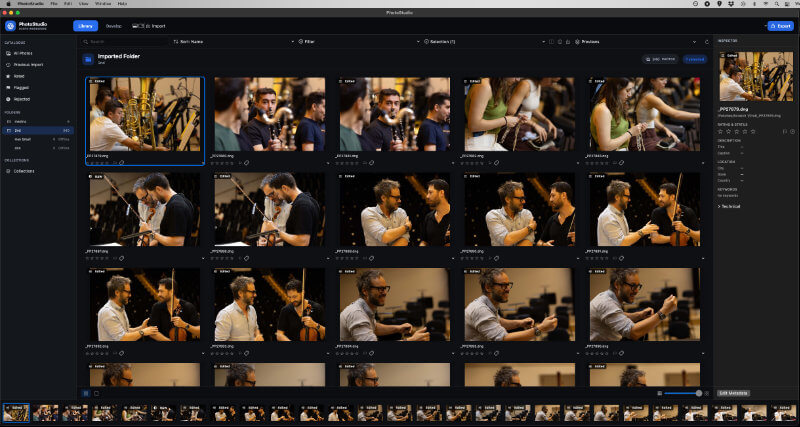
One of the most important parts of any professional photography application is its ability to manage large collections of photographs.
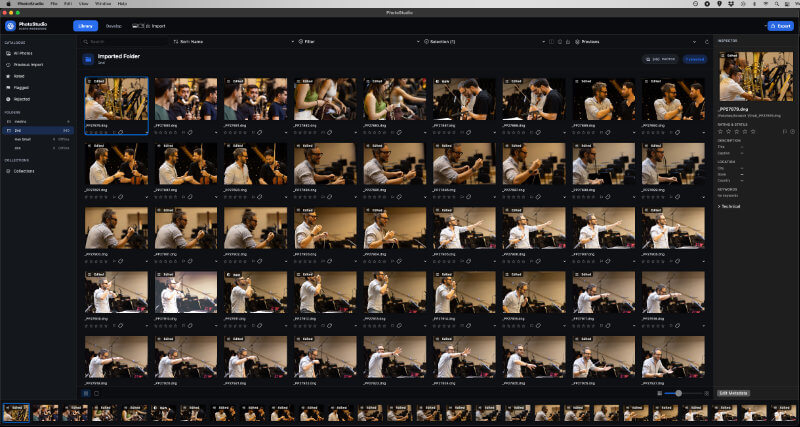
As a photographer, I regularly work with hundreds, sometimes thousands, of images from a single assignment. I need to import them, organise them, browse through them, select the photographs I want to work on and move between images without constantly waiting for the software.
This is something Lightroom had made look relatively effortless.
Recreating that experience in PhotoStudio was another matter.
Initially, importing larger collections could be frustratingly slow. Even after photographs had been imported, there were occasions when navigating through folders or switching between images took longer than it should.
The problem wasn’t simply getting the photographs into the application. It was making sure that everything remained accessible and responsive afterwards.
I quickly realised that importing a photograph and having it available for immediate editing are two very different things.
A professional photography application needs to manage the entire process, from the original file through to the catalogue, thumbnail and final preview.
It sounds obvious, but getting all those elements to work together reliably was one of our first major learning experiences.
The Problem with Lazy Loading
One of the things I particularly disliked during the early development stages was lazy loading.
For anyone unfamiliar with the term, lazy loading is a technique where software delays loading certain elements until they are actually needed.
On paper, this makes sense. Rather than processing everything immediately, the application loads content as the user navigates through it.
However, from my perspective as a photographer, this wasn’t the experience I wanted.
Imagine returning from a wedding with 1,000 photographs. You import the collection, open the Develop workspace and start moving between images. Instead of having everything ready, you find yourself waiting for previews to appear, images to render or the application to catch up.
That interrupts the entire editing process.
I had become accustomed to Lightroom’s approach of building previews in advance. It might take some time to prepare a large catalogue, but once the previews were generated, browsing and selecting photographs was considerably smoother.
That became one of my most important requirements for PhotoStudio.
I wanted a proper rendering and preview system, not an application that continually made me wait for photographs to become available.
We experimented with different approaches, and eventually the development direction became much clearer. PhotoStudio needed to build and retain permanent previews, including the edited versions, so that moving between photographs would not require repeatedly starting the rendering process.
This wasn’t simply about making the application appear faster. It was about creating a workflow that would remain responsive during a real photography assignment.
Bugs, Unexpected Behaviour and Plenty of Rebuilding
Then there were the bugs.
I don’t think anyone starting a software project fully appreciates how many different things can go wrong, particularly when the application involves several interconnected systems.
We would fix one problem, test the application, and discover that something else had stopped behaving correctly.
Sometimes a change to the Library affected the Develop workspace. On other occasions, a seemingly minor adjustment to the interface created unexpected behaviour elsewhere.
Navigation, folder selection, thumbnails, image orientation, exporting and catalogue persistence all needed attention.
There were also occasions when something that had worked perfectly in an earlier build suddenly stopped working after another improvement was introduced.
This meant that testing became an essential part of the development process.
I wasn’t interested in simply seeing whether PhotoStudio would open or whether I could make a few adjustments to an image. I wanted to use it as I would use Lightroom during a normal working day.
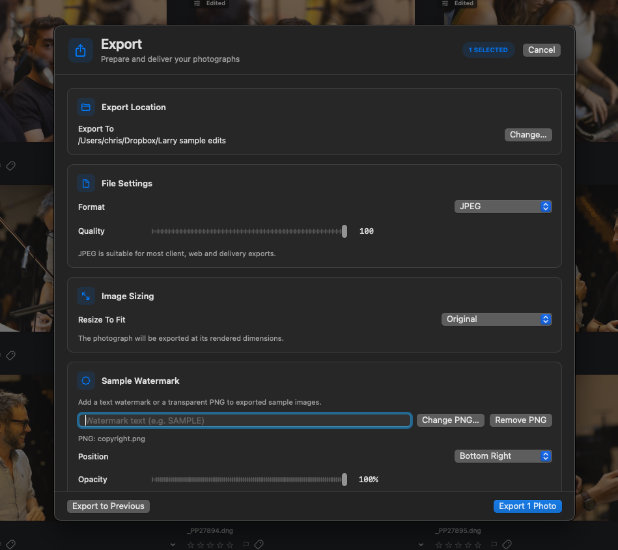
Could I import a large collection? Could I move between folders? Would the application remember my work? Could I select several photographs and export them together? Would the previews remain available when I reopened the catalogue?
These were the questions that mattered.
There were some frustrating moments, but each problem helped establish what the application actually needed to do.
Gradually, the Library became more reliable, navigation improved, and the catalogue started behaving much more like the photography management system I had originally envisaged.
The Lightroom Preset Problem: Importing Isn’t the Same as Reproducing
Perhaps one of the most interesting challenges was Lightroom preset compatibility.
This was particularly important to me because I had spent years building a collection of presets for different types of photography.
I use different treatments depending on the assignment. Wedding photography, commercial work, orchestra photography and outdoor portraits all require different approaches to colour, contrast and tonality.
I wanted to bring those presets into PhotoStudio rather than start again from scratch.
Initially, getting presets into the application seemed like a relatively straightforward task. We worked on importing Lightroom preset files, preserving their names and organising them into folders.
But there was a much bigger problem.
A preset can import successfully without producing anything like the original Lightroom result.
This was something we discovered quite early in the testing process.
Lightroom presets contain more than a collection of simple slider positions. They can involve profiles, tone curves, colour adjustments, channel mixing and other processing instructions. The way these settings are interpreted, combined and rendered is just as important as the values themselves.
In other words, reading the information contained in a preset is only half the job.
PhotoStudio needed to understand what those instructions meant and reproduce the intended appearance.
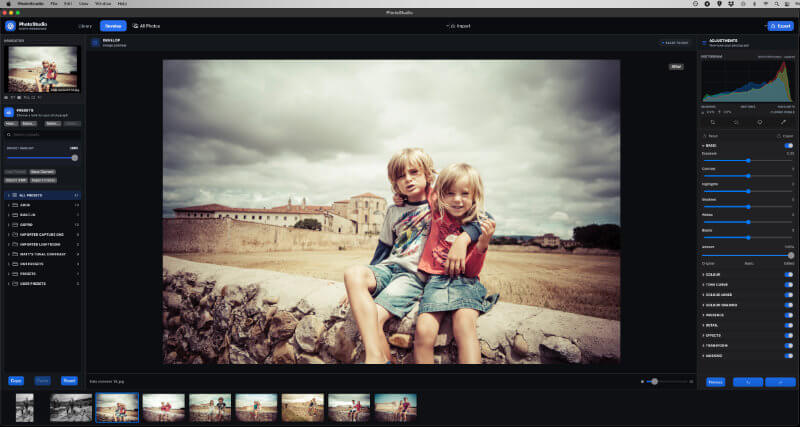
A preset might show an exposure adjustment, a colour temperature value and a particular contrast setting, but the final photograph could still look noticeably different from the Lightroom version.
I began comparing photographs edited in both applications, using the same original files and matching settings wherever possible.
The differences were sometimes quite obvious.
Black and white conversions were one area where we made encouraging progress, including the introduction of an eight-channel grey mixer. However, colour reproduction proved considerably more complicated.
Some colour treatments looked flat or washed out, while other adjustments behaved differently from their Lightroom equivalents.
It became clear that simply copying slider values wasn’t going to be enough.
We needed to understand how the original application interpreted those values and how PhotoStudio’s own rendering engine handled them.
This turned into a substantial development exercise, involving controlled comparisons, test images and plenty of adjustments to the processing pipeline.
I was determined not to settle for an application that could import a Lightroom preset but couldn’t reproduce the look I had spent years developing.
Learning to Think Like a Software Developer
Another unexpected part of the journey was how much I began learning about the technical side of photography software.
I started this project as a photographer who knew exactly what he wanted from an editing application.
I hadn’t set out to become involved in the details of image rendering, colour spaces, RAW processing, catalogue architecture or preview caching.
Yet these subjects quickly became part of everyday discussions.
I began to understand why certain operations were slow, why a preview could look different from a final export and why changing one part of the processing system could affect another.
It also changed the way I approached testing.
Instead of simply saying that an adjustment didn’t look right, I started looking at individual settings, comparing results and trying to establish exactly where the difference was coming from.
That was particularly important when trying to match Lightroom’s interpretation of exposure, colour and tonal adjustments.
The more we tested, the more I realised that building a professional photography application wasn’t just about putting editing sliders into an attractive interface.
Every component needed to work together.
Gradually, PhotoStudio Started to Take Shape
Despite the early frustrations, progress was being made.
The Library became more capable, catalogue navigation improved, and the Develop workspace gradually evolved.
We introduced more advanced preset management, improved selection and export functionality, and began building the persistent preview system that I had wanted from the beginning.
One particularly important milestone was getting Lightroom catalogue imports working, allowing existing photography collections to be brought into PhotoStudio’s own virtual catalogue structure.
This was a significant step because I didn’t want photographers to feel that moving to a new application meant abandoning years of organised work.
We also spent considerable time improving the overall interface, making it more practical for everyday use and bringing the Library and Develop workspaces closer to the workflow I had become accustomed to.
There were plenty of experimental builds along the way. Some worked beautifully, others introduced new problems, and a few had to be abandoned or revisited.
But the application was becoming increasingly recognisable as the software I had originally imagined.
Was Building My Own Lightroom Alternative Worth It?
There were certainly moments when I wondered whether I had underestimated the project.
It would have been much easier to accept one of the existing applications and adapt my workflow around it.
But that wasn’t really the point.
I wasn’t trying to create another photo editor simply for the sake of having one. I wanted to build something that addressed the way I actually work as a professional photographer.
I wanted fast catalogue management, dependable previews, flexible editing, proper preset support and an export system that could handle real assignments.
Most importantly, I wanted to understand and control the application rather than continually adapt to somebody else’s decisions.
Looking back at those early builds, the progress is quite remarkable. What started as an idea has developed into a working application that I have already been able to use in my photography workflow.
We are getting much closer to the final version, although there is still work to do, particularly in refining the rendering engine and ensuring that Lightroom presets behave as consistently as possible.
And that brings me to the next stage of the journey.
Chapter 3: Getting PhotoStudio Ready for Real Photography Work
The next challenge is taking everything we have learned and turning PhotoStudio into a dependable application that I can use regularly for client assignments.
That means more than adding new features. It means testing the application with real photographs, large catalogues and demanding editing sessions.
It also means looking at things that are easy to overlook when developing software, such as lens profiles, image orientation, export quality, colour accuracy and the consistency of previews.
The exciting part is that we are now getting close to that stage.
I have already used PhotoStudio on my Mac running macOS Monterey to import photographs and export watermarked samples for a client. That was a particularly satisfying moment because it demonstrated that the application was moving beyond development experiments and into practical use.
There is still a journey ahead, but the original idea is becoming a reality.
I started out wanting a Lightroom alternative that suited the way I work.
Now, after countless tests, rebuilds, corrections and a fair amount of head scratching, I am getting closer to having exactly that.
And I have to say, it is incredibly exciting.
To be continued…